
TL;DR
I made a dockerized container to deploy a Perforce-integrated Unity CI/CD Jenkins server in this repo.
Motivation
When I started working on The Veiled Ones, we had heard that another team from the year before us (Blindsight: War of the Wardens) had gotten Jenkins CI/CD integrated with Perforce to automatically generate and submit their game builds. As an indie studio we didn't have to set one up, but CI/CD is still really nice to have.
The most obvious benefit is automation. The entire process of building + packaging + submitting games by hand is super annoying. For example, one might have to:
- Manually click buttons to create a build for Windows
- Wait forever
- Click more buttons to create a build for MacOS
- Wait forever again
- Zip up builds
- Upload them to Perforce/Steam
On the other hand CI/CD is flexible enough to handle all of this automatically, delivering builds on a schedule or on-demand.
CI/CD is also more important for game development specifically, since games tend to require heavier playtesting, quality assurance, and user feedback than other types of applications. Most non-game apps have a restricted set of independent features and a smaller state/action space, making it easier to write tests to catch bugs and achieve 100% coverage. However, the same is not true for all games - with a wider range of possible states and actions, it's not hard to understand why glitches, softlocks, and crashes are so common. Having an up-to-date build readily available makes it much easier for QA and usability teammates to conduct manual testing. It's also good to consistently test the latest game build with new playtesters to see whether recent additions and design choices work as intended.
There are benefits to having the build environment separate from development environments too. First, this helps ensure there is a clean "source of truth" on the latest publishable build and what is/isn't working. Sometimes in collaborative projects, someone might say a missing/broken feature was working on their end when in reality they forgot to pull latest or submit local changes. A build environment stays clean so there's no debate.
Also, the separation helps alleviate some build bugs I've seen in the past.
For example, there's an issue when a game project integrated with Wwise is hosted on Perforce.
For whatever reason a Perforce-integrated Unity project will automatically add/check out Wwise soundbank files, but that causes builds to fail with a permission error (since I guess they can't access the files).
However, if a build environment is configured without a Perforce setup, it won't automatically add or check out files, so building won't conflict with Wwise.
Additionally, if the build server is hosted in a Unix-like environment, you can build with the executable flag so it works natively for Mac, whereas if the Mac build was built on Windows a playtester might have to manually use xattr to fix up permissions to play the game.
Initial research
I looked around for free CI/CD solutions, but all I could find was GameCI's unity-ci, which only supports GitHub and not Perforce. So, I decided to stick with Jenkins, and I contacted the person who set up CI/CD on Blindsight for some starter tips.
For The Veiled Ones, I wanted to make a Docker container to host the build server - that way, I could easily carry the build server I made to other computers or even adapt it for other projects.
Here are some of the pros and cons of a Dockerized instance versus a local installation:
- Dockerized instance
- Pros
- Full isolation of the build environment
- Can be run on any machine that has Docker installed
- Can be run on a cloud service
- Cons
- Can be slower to build, hard to get GPU access
- Can be more difficult to add things like third-party packages
- Pros
- Local installation
- Pros
- Full control over the build environment (could get messy easily)
- Faster to build
- Easier to iterate upon
- Cons
- Harder to migrate elsewhere
- Pros
Development process
When I first started working on the CI/CD server, The Veiled Ones was still just kicking off. As such, I decided to re-use an old game prototype to test the build server.
To begin, I wanted to make sure that the Jenkins server could work with Perforce and Unity in the first place.
I set up my own Perforce server and depot, and I spun up a jenkins/jenkins Docker container.
Then, I played around with the server configurations via the Jenkins UI and read up on Unity and Perforce CLI to see how I could script the build + upload process.
I was able to create a freestyle project to make automatic builds pretty quickly.
The next step was to get as much working out-of-the-box in the Docker container as possible.
Jenkins server
The Jenkins server Docker setup process was relatively simple. Most of this was simply branching my Dockerfile off of jenkins/jenkins.
I did however make some small customizations to automatically install useful plugins. It took me a while to realize that the plugins.txt is very finnicky - I think there was likely some conflict with how line endings are written Windows.
Unity and Perforce
I based the Unity installation commands off of the unity-ci Docker files.
Turns out, Unity Docker setup is not very streamlined - you have to install Unity Hub, install a bunch of unmentioned dependencies, then use xvfb-run to run Unity Hub properly to install Unity, then finally activate Unity with a license file.
Since the license activation requires authentication and communication with Unity servers, I left this final part out of the Docker setup and had it as a manual post-install step instead.
Perforce integration was a lot easier - the Jenkins p4 plugin made it easy to configure Perforce as the SCM and artifact publisher. The build script would handle building, zipping, and cleaning prior to the post-build steps.
Wwise
This was by far the hardest thing to integrate and debug. There was basically no documentation on this, especially since Linux is rarely used to build games, so I had to mess around a lot. I don't know what exactly got it working in the end, but here is a rough outline of what I tried:
Wwise installation
Requires manual setup
- Install Linux SDK
- Take note of the path to the Linux_aarch64/Release directory
- Copy the release directory to /var/jenkins_home/Wwise/Release
If you don't do the steps above, then you might run into the error Native extension for LinuxStandalone target not found
Wwise fixups
You might have an issue when building games that use Wwise like seen here and here
- TLDR, you must first ensure you have Wwise platform integration for Linux enabled since that's what this Docker container uses to build
- Then, fix the define directives so that Wwise scripts work on
UNITY_EDITOR_LINUX. For me, that includes fixing the following files:- In
Wwise/API/Runtime/Generated/Linux:AkAudioAPI_Linux.csAkCommunicationSettings_Linux.csAkPlatformInitSettings_Linux.csAkSoundEngine_Linux.csAkSoundEnginePINVOKE_Linux.csAkThreadProperties_Linux.csAkUnityPlatformSpecificSettings_Linux.cs
- In
Wwise/API/Runtime/Handwritten/Common:AkSoundEngine.cs
- In
Wwise/API/Runtime/Handwritten/Linux:AkLinuxBasePathGetter.csAkLinuxSettings.csAkSoundEngine.cs(also fixing a weird character bug)
- In
Hopefully these issues are fixed in future Wwise releases.
Discord notifier
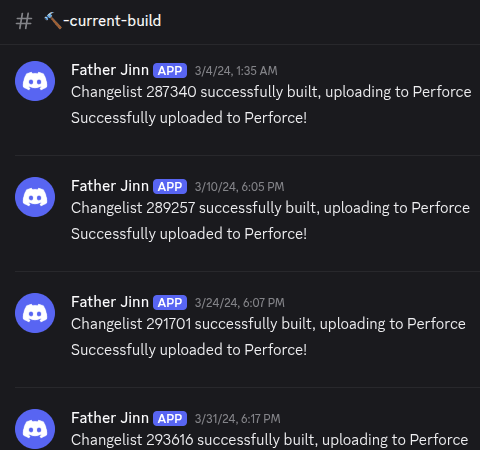
Finally, we wanted to be notified in Discord when new builds succeeded/failed. This was pretty simple: just add another step in Jenkins to make a simple web request to a Discord webhook URL. I used the HTTP request Jenkins plugin with something like:
HTTP Request: <discord webhook API endpoint>
HTTP Mode: POST
with advanced settings set to:
Content-Type: APPLICATION_JSON
Request Body: {"content":"your message here"}
With this basic notifier, team members who were running playtests or QA tests would be able to know when a new build was available to try.
Retrospective
To be honest, if I could travel back in time I would tell myself not to waste my time on Dockerization. I never had to move the build server to another machine, and if I did the setup was still half manual so it wouldn't have been nice. On top of that, the Docker environment was in Ubuntu, which made it difficult to debug issues that didn't appear in our Windows development servers. Towards the end of our development, when we added a video intro cutscene to the game, only builds from the CI/CD server would black out when the video was playing. Since it was crunch time, I didn't have the time to debug why the CI/CD server was running into that issue, so we switched to manual builds from that point onwards. Also, the CI/CD server took longer to build than if we did it manually; in hindsight I could have looked into build caches or adjusted the allocated resources in Docker, but I didn't think much of it at the time.
Nonetheless, it was a cool experiment and I was glad to see it working in the end! Based on stats we ended up automating 112 builds and about 12 hours of waiting, packaging, and submitting builds. Any project with more than a year of development and a more frequent build rate would definitely see more hours saved with CI/CD.